# Make your video content indexable on your own site.
Publish what your videos say as visible HTML on your WordPress pages. Give search engines text they can crawl and potentially index on your own site, then add video metadata, chapters and a useful reading experience.
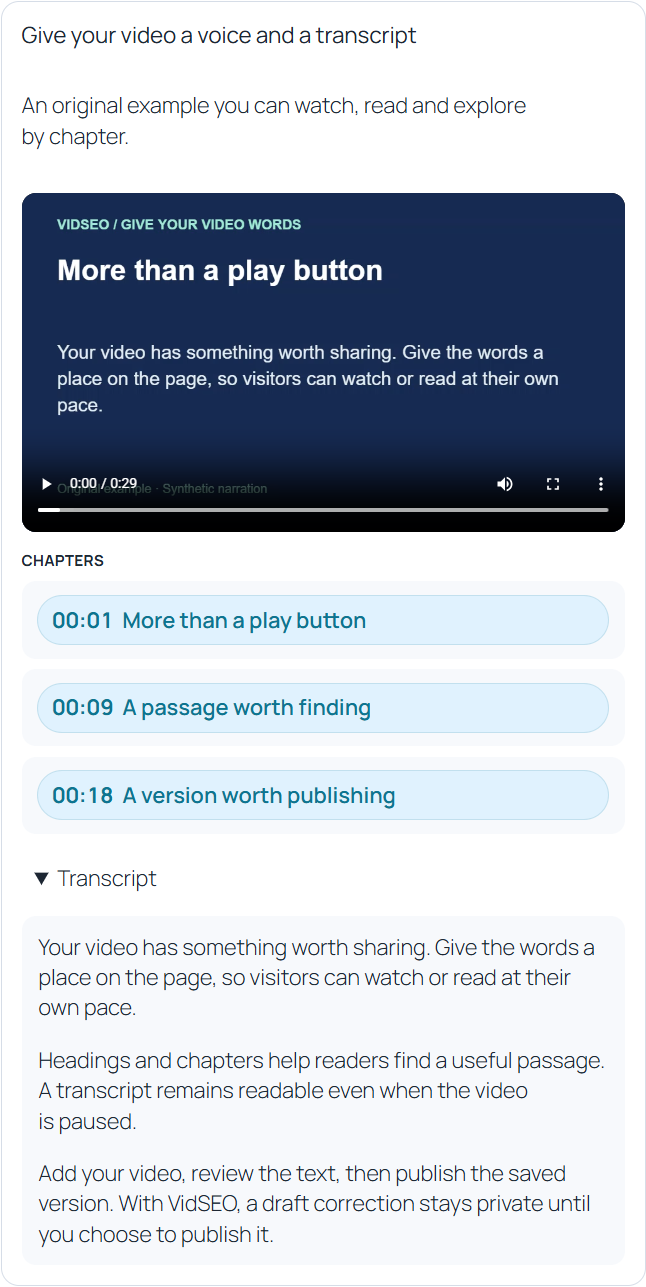
Enlarge screenshot ↗The actual VidSEO block with video, transcript and chapters.
## Put the words in your own page
An embedded player does not itself add the transcript to your page’s HTML. VidSEO publishes the reviewed text beside the video, on your own URL. When that page is public, crawlable and permitted to be indexed, search engines can consider the text as part of your site’s content.
Making text available for indexing is different from Google indexing a video or displaying a video result. VidSEO does not guarantee either outcome, rankings, traffic or AI citations.
## Add the separate video SEO layer
Enter a title, description, thumbnail and original publication date. VidSEO uses a shared metadata check for the publication summary and eligible structured output.
- Configure `VideoObject` structured data.
- Add eligible chapter information through `Clip`.
- Opt eligible videos into the video sitemap.
- Choose an existing main page in either edition.
- Enable public transcript endpoints, machine exports or a catalog when you need them.
Schema and the video sitemap describe and expose eligible video information; they do not replace the transcript in the page. Public outputs depend on publication state, permissions and the relevant site and video settings. Video indexing and rich results have separate requirements.
## Give readers another way into the video
A published transcript is rendered as HTML by the server. Visitors can read the explanation without playing the video or depending on JavaScript to load the text.
Add chapter titles and valid start times. Arrange chapters in the order that helps readers navigate. Missing timing stays unknown; VidSEO does not invent timestamps to complete an output.
## Start with content you can review
Add a YouTube or Vimeo video, or a supported HTML5 media address. Write the transcript yourself or import an authorized UTF-8 TXT, SRT or VTT file. An import becomes a private candidate for you to review before adopting it.
Organize the document with headings, paragraphs, lists, emphasis and links. Search and replace wording, or edit transcript segments. These everyday editorial tools are available in **Free and Pro**.
## Save privately. Publish deliberately.
Saving updates the working document. Publishing makes the saved version available through eligible public placements. Later draft edits do not silently replace the published transcript.
Insert a video with the VidSEO block or its shortcode. An ID placed on a public page does not turn a private source into public content.
## Choose how the player loads
Select a player that loads after a click, or an integrated player that can load with the page, subject to your site's consent configuration. Player loading is separate from autoplay.
The transcript-origin mention is optional and hidden by default. Preview the result in your theme, including on mobile.
## Add Pro for richer editorial workflows
Pro adds custom chapter slugs and descriptions, caption-track and speaker-profile editing, AI batches, and creation of a draft watch page. Caption tracks are file references, and speaker profiles are editorial records; neither promises automatic caption generation or speaker recognition.
[Compare Free and Pro](/free-vs-pro/)
## Explore optional AI when it serves your workflow
An optional OpenRouter connection can request transcription for supported YouTube URLs through a configured Gemini model. It is disabled by default, uses your provider account and requires spending permission. Results remain private candidates requiring review. Availability and accuracy depend on the provider, model and video. Pro does not include AI credits.
YouTube captions API retrieval is disabled in 2.0 in both editions. Manual text, authorized file imports and normal video playback remain available.
Bring your video content onto your site.
Add a video, review its transcript and publish the words as part of your WordPress page.
 Enlarge screenshot ↗